



Processing Chandrayaan 2 TMC-2 Images
More info on Chandrayaan 2:
- Chandrayaan 2 Mission - USGS Astro
- Processing Chandrayaan 2 OHRC Images
- Chandrayaan 2 Stereo - Ames Stereo Pipeline
Environment
You will need:
- ISIS 10.0.0_RC2
- ALE >= 1.1.3
- SpiceQL >= 1.2.7
- usgscsm
To install these with conda:
conda create -n ch2 \
    -c usgs-astrogeology/label/RC \
    -c conda-forge \
    matplotlib isis=10.0.0_RC2 ale=1.1.3 usgscsm=2.0.2
conda activate ch2 # activate env
ISIS 10 release candidate
ISIS 10 has not been formally released yet, so the command above installs the
10.0.0_RC2 release candidate from the usgs-astrogeology/label/RC channel.
Image Data, Label, and Template
The .img image and .xml label are required to import a TMC image into the ISIS cube format. These can be downloaded ISRO's interactive map or ISRO's PRADAN system for bulk downloads. (New users must register an account.)
SPICE Kernel Coverage
Chandrayaan 2 SPICE kernels are distributed through the ISIS data area and fetched with downloadIsisData chandrayaan2 $ISISDATA. Coverage may still lag for the most recent acquisitions. You can check which kernels are available with the following CURL command:
curl -XGET "https://astrogeology.usgs.gov/apis/spiceql/latest/searchForKernelsets?spiceqlNames=\[chandrayaan2\]&limitCk=-1&limitSpk=-1" | jq
The filenames for CKs and SPKs tell you their time coverage.
Example Data
To follow along you can download an example image from here.
Set Environmental Variables
ISIS requires ISISROOT and ISISDATA to be set. You can set ISISROOT equal to the CONDA_PREFIX as below. You will need to set up the ISIS Data Area and set ISISDATA to point to it.
Create a ISIS compatible Cube or GTiff
Once set up you can import with isisimport
isisimport from=ch2_tmc_nra_20230214T2032466433_d_img_n18.xml to=ch2_tmc_nra_20230214T2032466433_d_img_n18.cub
# create and ISD, this creates a file ch2_tmc_nra_20230214T2032466433_d_img_n18.json
isd_generate -s ch2_tmc_nra_20230214T2032466433_d_img_n18.cub
Local Kernels
isd_generate -s assumes you have local SPICE kernels set up, so make sure you have ISISDATA set with base and chandrayaan2 installed. You can install these data with:
You can troubleshoot isd_generate with -v, most common issue is missing kernels covering the images time range.
Check you have the files, you will need the .json and .cub
ls -1
# ch2_tmc_nra_20230214T2032466433_d_img_n18.cub
# ch2_tmc_nra_20230214T2032466433_d_img_n18.img
# ch2_tmc_nra_20230214T2032466433_d_img_n18.json
# ch2_tmc_nra_20230214T2032466433_d_img_n18.xml
From here you can use the .cub and .json for any CSM compatible tool like Socet GXP or Ames Stereo Pipeline.
Create an ISIS-compatible image
To use this image in ISIS, you will need to combine the JSON ISD with the cube. These can be written as an ISIS Cube or Gtiff. Although, we recommend GTiffs given the large size of CH2 images.
```
mamba install usgscsm # if not installed already
csminit from=ch2_tmc_nra_20230214T2032466433_d_img_n18.cub isd=ch2_tmc_nra_20230214T2032466433_d_img_n18.json
cubeatt from=ch2_tmc_nra_20230214T2032466433_d_img_n18.cub to=ch2_tmc_nra_20230214T2032466433_d_img_n18.tiff+GTIFF
```
You can view the image with qview, warning, image is very large and might take a minute to render.
Gtiffs can be rendered with anything supporting Tiffs, but pixel scaling might cause them to render as black images. We recommend qview, qgis, other tools designed for spatial data.
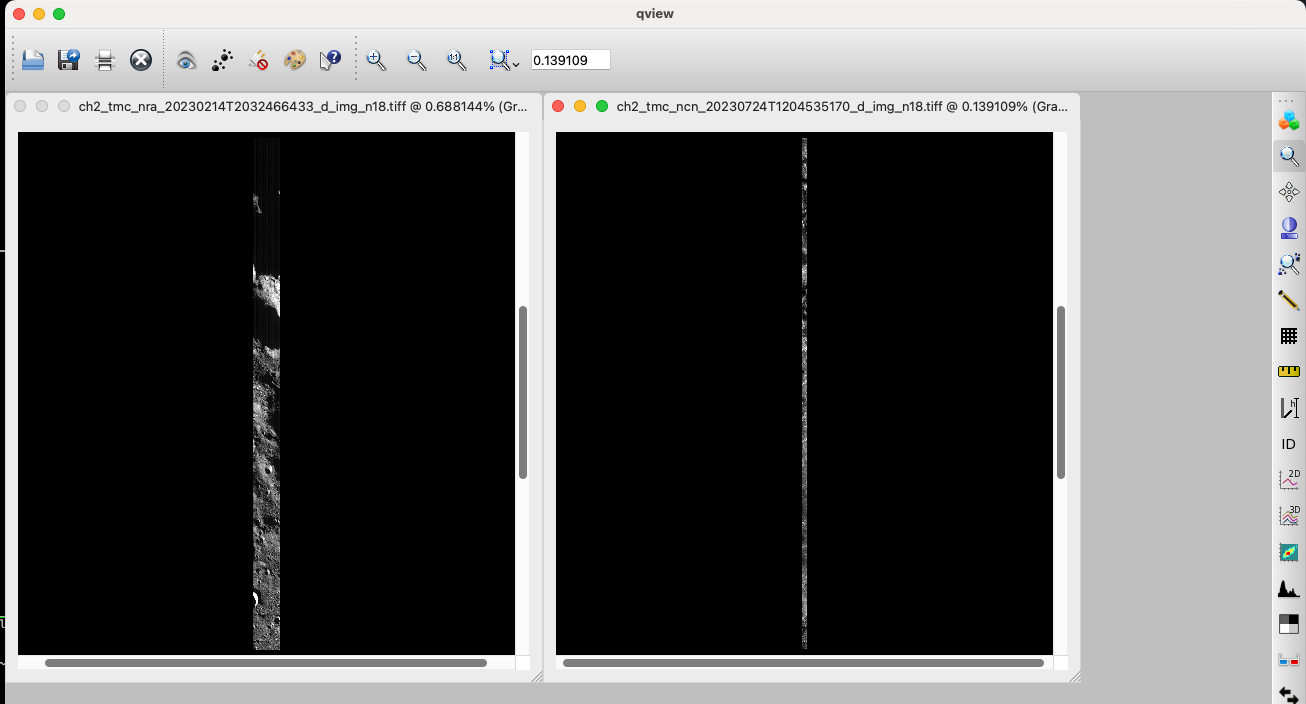
Test image on the left, more typical TMC2 image on the right. Test image is smaller than typical TMC2 image. As you can see, TMC images stretch very far (~1/3 of the planets latitude), image on the left is 74k lines, image on the right is 368k lines. Apps like ISIS's crop can be used to trim the image while maintaining camera data intact.
From here you can use the image in other ISIS apps such as footprintinit and cam2map. Initial pointing in TMC2 has errors (as most instruments). So bundle adjustment is necessary for accuracy.
See for bundle adjustment info: https://astrogeology.usgs.gov/docs/how-to-guides/image-processing/bundle-adjustment-in-isis/
See for stereo info in ASP (similar for TMC2): https://stereopipeline.readthedocs.io/en/latest/examples/chandrayaan2.html#stereo